Portfolio Store
Portfolio Store · Show the transformation

Build a before and after portfolio clients can explore

Turn your transformation photos into a portfolio you can share with your next client. Upload before-and-after images, organise your work into projects and choose a template that makes the change easy to see — all from your phone.

Portfolio Store Build your portfolio
Also available on
Get it on Google Play
Plan your transformation gallery
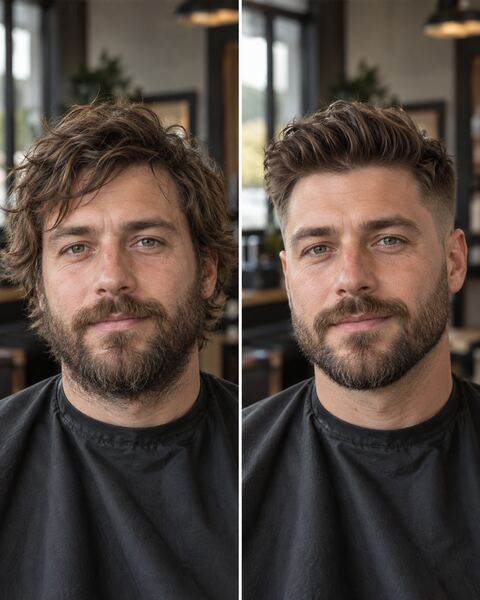
Before and after haircut comparison from the Alex Morgan Barber demonstration portfolio
A before-and-after image from Alex Morgan Barber, a fictional demonstration profile.

Before and after · Built with Portfolio Store

Show the change that makes your work worth booking

This haircut comparison gives the starting look and finished result space in the same image. A client can understand the transformation immediately, then explore more cuts and grooming projects in Alex’s portfolio.

You can upload a comparison image you have already prepared, like this one, or use separate before and after photos in your gallery. Choose clear, matching views so the work speaks for itself.

Explore Alex Morgan Barber’s portfolio ↗

Give every transformation a beginning and an outcome

Show clients where the job started, what you changed and how it finished. A focused gallery helps barbers, beauty professionals, renovators and detailers turn a visible improvement into a clear reason to get in touch.

A practical five-step creation workflow

1. Choose work with a visible change

Select a few completed jobs where the improvement is clear. For a kitchen refinish, show the original surfaces and the finished paintwork. For a haircut, show the initial length and final shape. Avoid unrelated photos that make the sequence hard to follow.

2. Prepare honest pairs

Use comparable viewpoints and lighting where possible. Keep the before and after views together in a single comparison image if you want them to remain side by side on every screen. Do not edit a starting photo to exaggerate a result, and obtain permission before publishing recognizable people or private spaces.

3. Build your project gallery

Add the images in Portfolio Store and inspect their displayed sequence. The Free plan currently supports one project and five images; paid plans offer larger allowances. A prepared comparison uses one image slot; separate before and after photos use two. Check current plans before preparing a large gallery.

4. Explain the work

Give the project a specific title and use its description to explain the service and result. “Haircut transformation” or “Kitchen cabinet restoration” tells a client more than “Project 1”. Keep the story short and let the photographs show the detail.

5. Publish, test and share

Open the public portfolio URL in a mobile browser, check the image order and crop, then share that link with a prospective client. Send it with your next enquiry response or estimate so clients can see relevant work before deciding.

What makes a transformation convincing?

Good before-and-after presentation is not about dramatic effects alone. The viewer should be able to tell that both photographs document the same job and understand what changed. Consistent angles, an honest time sequence and a small amount of context make a result easier to assess than a collage of unrelated finished shots.

Renovation and restoration

Pair the damaged surface or unfinished room with the repaired result. Include detail shots of joints, finishes or repaired areas when they help a client judge workmanship. Avoid suggesting that a single photograph proves structural safety or compliance.

Hair, makeup and beauty

Show the initial look and the final style with consent. Use comparable framing and avoid filters that change skin texture or color. A prospective customer may care as much about suitability and finish as about the size of the change.

Detailing and cleaning

Show a specific area before and after treatment: upholstery, a headlight, a floor or a vehicle panel. A tight, repeatable viewpoint can be more useful than a wide image in which the improvement is difficult to locate.

For more ways to present haircut transformations, explore our barber portfolio examples. For larger jobs, see how a project-based portfolio keeps each transformation easy to follow.


Check the story before you publish

  1. Can a visitor identify which photo is before and which is after?
  2. Do both views document the same project without misleading edits?
  3. Have clients and property owners approved public use where necessary?
  4. Does the first project reflect the type of work you want to be hired for?
  5. Have you tested the public URL on a phone outside your editing session?
  6. Are service claims and descriptions limited to work you actually completed?

A simple gallery of genuine transformations is more useful than a flashy effect that obscures the work. The goal is to help clients decide whether your experience fits their project.

Frequently asked questions

Does Portfolio Store include a before-and-after slider?

Portfolio Store displays your photos in a portfolio gallery; it does not include an interactive comparison slider. Upload a ready-made side-by-side comparison, as in Alex’s example, or add separate before and after photos.

Can I start a transformation portfolio for free?

Yes. Free includes one project and five images: for example, two before/after photo pairs and a finished detail, or up to five prepared comparison images. More images and projects require an eligible paid plan; review pricing for details.

Should I put all jobs in one project?

For a small Free portfolio, choose one focused project. With a plan supporting multiple projects, separate unrelated jobs so visitors can understand each transformation without confusion.

Do I need professional photography?

No. Clear, well-lit and consistently framed phone photos can communicate a change. Make sure the images are sharp enough to judge the result and represent the work accurately.

Can customers open my portfolio without signing in?

A published public portfolio link can be opened in a browser without a viewer account. Verify the actual visibility settings and published page before sharing it.

Can I use it for estimates or appointments?

You can share a portfolio link as evidence of previous work while discussing an estimate or appointment separately. The gallery does not automatically calculate quotes or schedule bookings.

Let the work tell the story, from start to finish

Choose a few honest transformations, publish a gallery that reads clearly on a phone, and have a link ready for the next client enquiry.

Portfolio Store Build your portfolio
Also available on
Get it on Google Play